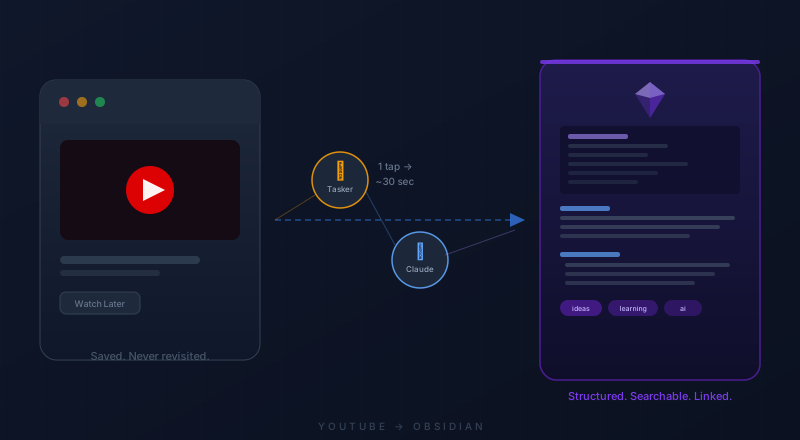
I tap Share on a YouTube video. Choose YT to Obsidian from the share sheet. Thirty seconds later, a structured note is sitting in my Obsidian vault — title, summary, key ideas, tags, source link, date captured.
One tap. Zero friction. The idea is captured before I talk myself out of it.
The problem
I was losing good ideas the moment I found them.
Not because I wasn't paying attention — because the gap between finding something useful and doing something durable with it was just wide enough to fall through. Videos got saved to Watch Later. Links got texted to myself. Screenshots piled up.
That's not a second brain. That's a junk drawer with good intentions.
What it does
The phone grabs the YouTube link, pulls the full video transcript via API, sends it to Claude with a formatting prompt, and writes the output as a Markdown file directly into my Obsidian vault.
The note that comes out isn't a transcript dump. It's a structured inbox entry — useful title, tight summary, key ideas, relevant tags, source metadata. Everything a future AI search, or my future self, needs to actually use it.
How it works
The build is simple conceptually: one Android automation, two API calls, and an Obsidian folder.
When I find a useful YouTube video, I tap a custom share button on my phone. Tasker receives the shared link, URL-encodes it, and sends it to Supadata to pull the transcript. Tasker then sends that transcript to the Claude API with a prompt that turns it into a clean markdown note. Finally, Tasker writes the file directly into my Obsidian inbox.
Why this matters — the second brain
I've been building an AI-native Obsidian vault — a knowledge graph where every person I meet, idea I encounter, and decision I make gets linked to everything else I've ever captured.
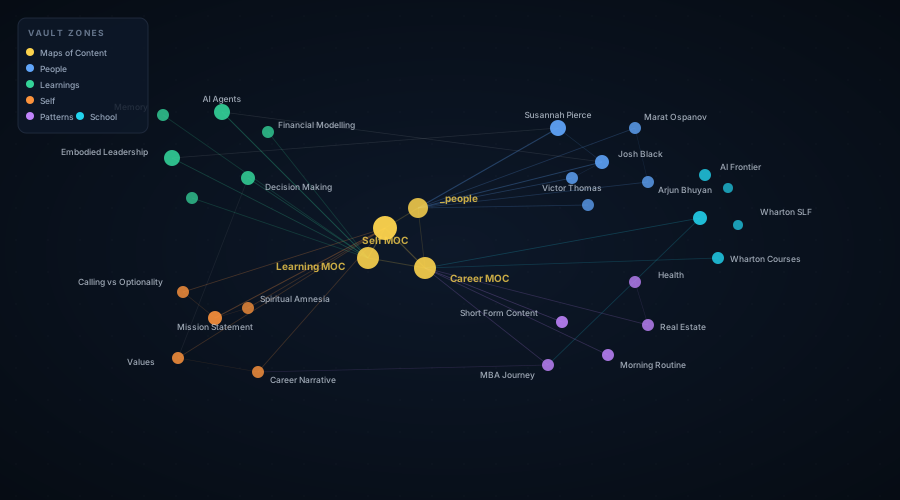
The graph only works if what goes in is structured. A raw YouTube link teaches the system nothing. A note with a clear summary, relevant tags, and links to related concepts becomes a node the graph can actually use — searchable, linkable, connectable to things you were thinking about months ago.
This workflow is capture infrastructure. It makes the graph stronger every time I tap Share.
The pattern is reusable
YouTube was just the first pipe. The same flow works for anything:
- Podcasts → transcript → note
- Articles → reader view → summarized note
- Voice memos → transcription → concept note
- PDFs → key ideas extracted → evergreen note
The template changes. The pipeline stays the same.
Most people still treat AI as a separate destination — open a chat window, ask something, copy the output elsewhere. What I'm building is different: AI that disappears into the workflow so the note just shows up where it belongs.
The value isn't the model. It's the system around the model.
One tap from YouTube to Obsidian. Five hours of debugging to get there. Absolutely worth it.
The entire build was guided by Claude Code — from wiring the Tasker flow to diagnosing the variable bugs. It's genuinely a different experience having an AI that can hold the full context of what you're building and think through the handoffs with you.